Rosetta
Rosetta is a series of software compatibility layers used in several versions of macOS, during periods when Apple transitioned its computer lineup from one processor architecture to another. They allow users to continue using older applications on new computers while giving developers time to update their software. The first version of Rosetta allowed applications written for PowerPC-based Macs to run on Intel-based ones; the second version allowed Intel applications to run on Apple Silicon Macs.
Mac OS X 10.4.4 "Tiger" included the first version of Rosetta during Apple's transition to Intel x86 processors. It operated without any user intervention, automatically translating PowerPC applications into Intel-compatible versions as they ran. Since this process requires processing power, some applications ran slower through Rosetta on Intel-based Macs than on PowerPC processors. This version of Rosetta was removed from Mac OS X in version 10.7 "Lion" after the transition to Intel was completed.
A second version of Rosetta was introduced in macOS 11 "Big Sur," as Apple began another processor architecture transition from Intel x86-64 processors to their own ARM-based Apple Silicon processors. This version of Rosetta translates applications written for Intel Macs to run on Apple Silicon and does so when the apps are installed rather than at runtime. Translating them ahead of time means that most applications run just as fast, if not faster, through Rosetta on Apple Silicon than on the Intel Macs they were written for.
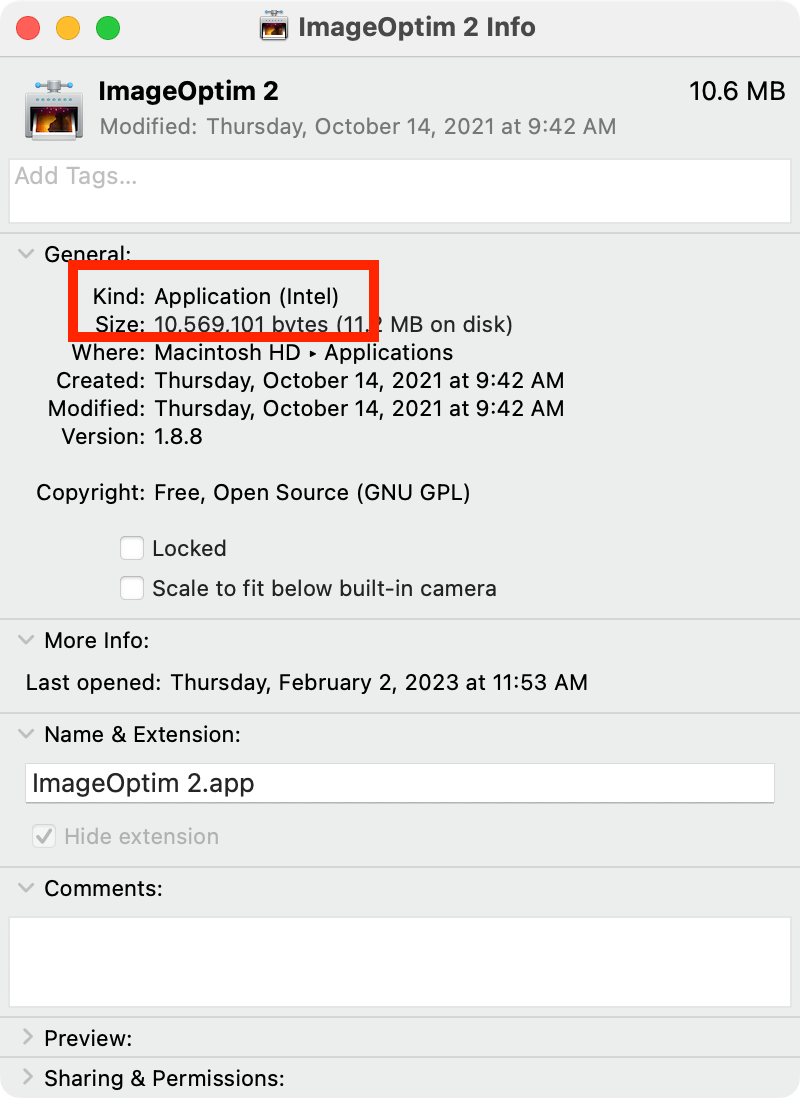
NOTE: You can check an application's architecture by selecting the application icon in the Applications folder and choosing "Get Info" from the File menu (or pressing Command-I). If the Kind is listed as "Application (Intel)," it is an Intel app that will run through Rosetta; if it says "Application (Universal)," the application's developer compiled it for both Intel and Apple Silicon processors; if it appears listed as "Application (Apple Silicon)," it was developed only for Apple Silicon Macs and will not run on Intel Macs.
 Test Your Knowledge